

Wait! Don’t Go Yet! 👋
Become a Member Today and Unlock Access to All eBooks! 😍
Thousands of eBooks at your fingertips. Read, learn, and grow anytime, anywhere ✨
Become a Member Today and Unlock Access to All eBooks! 😍
Thousands of eBooks at your fingertips. Read, learn, and grow anytime, anywhere ✨
Learn how to Use ESP32 with VS Code & Platformio to Upload Files to Filesystem (SPIFFS). Instead of needing to write everything within the Arduino sketch, it may be useful to leverage the filesystem with the ESP32 to save HTML, CSS, and JavaScript files to create a web server.
If you’re using Arduino IDE, follow this tutorial instead: Install ESP32 SPIFFS Filesystem Uploader in Arduino IDE.
The Serial Peripheral Interface Flash File System (SPIFFS) is built into the ESP32. For microcontrollers with flash memory chips connected through the SPI bus, like the ESP32 flash memory, SPIFFS is a lightweight filesystem.
Although SPIFFS is simpler and has fewer features than a normal filesystem on your computer, it still allows you to access flash memory. You can open, shut, read, write, and delete files. Since directories are not supported by SPIFFS, everything is saved as a flat structure.
Using SPIFFS with the ESP32 board is especially useful to:
Under the project folder, under the data folder, put the files you want to upload to the ESP32 filesystem. We'll upload a .txt file with some random text to help you understand how everything works. Any other file type is acceptable for upload.
Top 6
ESP32 eBooks
From Zero to Professional

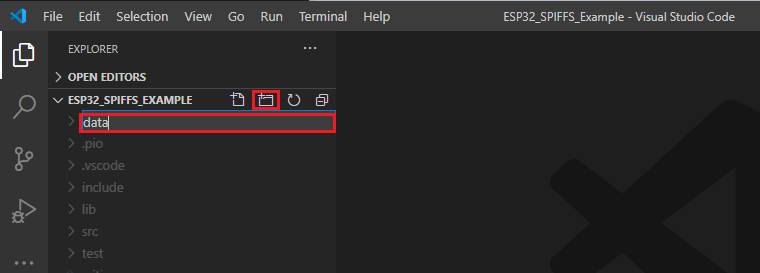
Inside the folder for your project, create a folder called data. VS Code can be used for this. Select the project folder that you are working on with your mouse. To create a new folder, click the “New Folder” button.
Otherwise, it won't work. This new folder must be called data.
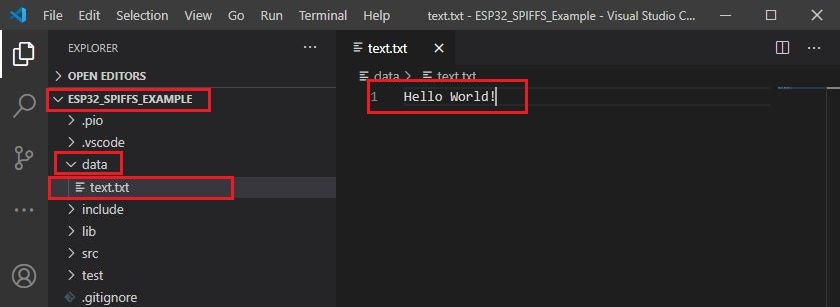
Select the files you wish to upload by clicking the New File icon in the newly formed data folder. We'll create a file called “text.txt” for this example. Any other file type, like .html, .css, or .js files, may be created and uploaded.

Write some random text inside that “.txt” file.
The data folder should be within the project folder, and the files you wish to upload should be inside the data folder. It will not work otherwise.
Follow the next steps after creating and saving the file or files you want to upload to the data folder:

Important: To upload the filesystem image successfully, you must close all serial connections (Serial Monitor) with your board.
After a while, you should get a success message.

Top 6
Arduino eBooks
From Zero to Professional

Here are some common mistakes:

This issue signifies that in VS Code or any other program, a serial connection has been opened with your board. Make sure to close all serial connections in Visual Studio Code (click the recycle bin icon on the terminal console) and terminate any programs that could be using the board serial port.

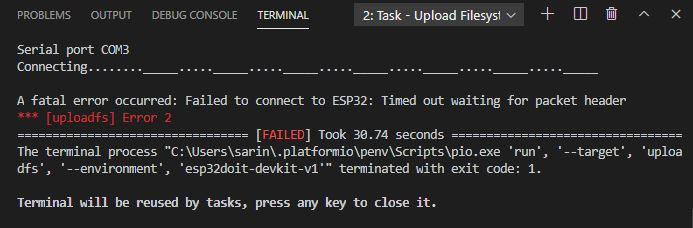
You need to press the on-board boot image button once you start seeing a lot of dots on the debugging window and the filesystem image fails to upload.
To solve this issue permanently, read the following article:
Check to see if the file was really saved to the ESP32 filesystem now. In the main.cpp file, paste the following code, then upload it to your board:
/*********
  Ebokify
  Complete project details at https://ebokify.com/esp32-with-vs-code-platformio-spiffs/
*********/

#include <Arduino.h>
#include "SPIFFS.h"

void setup() {
  Serial.begin(9600);

  if(!SPIFFS.begin(true)){
    Serial.println("An Error has occurred while mounting SPIFFS");
    return;
  }

  File file = SPIFFS.open("/text.txt");
  if(!file){
    Serial.println("Failed to open file for reading");
    return;
  }

  Serial.println("File Content:");
  while(file.available()){
    Serial.write(file.read());
  }
  file.close();
}

void loop() {

}
The following line may need to be changed depending on the name of your file:
File file = SPIFFS.open("/text.txt");Open the Serial Monitor, and it should print the content of your file.

You’ve successfully used ESP32 with VS Code & Platformio to upload files to Filesystem (SPIFFS).
In this tutorial, you've learned how to upload files to the ESP32 filesystem (SPIFFS) using VS Code & PlatformIO. It is quick and simple.
This can be especially useful for uploading HTML, CSS, and JavaScript files to develop web server projects with the ESP32 boards.
If you like ESP32, you may also like:
We hope you find this tutorial useful. Thanks for reading.
🚀 Discover the world of electronics and innovation!
✨ Create, program, and experiment with all your creative ideas with ease.
🔥 Don't wait! Browse SpotPear products now and start your amazing project!