Book Categories:



Build a Step Counter With ESP32 and MPU6050 Accelerometer

In this project, we’ll build an ESP32 Step Counter (pedometer) using the MPU6050 accelerometer/gyroscope sensor. The ESP32 will measure steps based on acceleration data and display the step count on a simple web server you can access from your phone or computer.
We’ll also include a reset button on the web page to easily reset the step counter.
Table of Contents
ESP32 Step Counter – What You Need
Here’s a list of all the parts you need to build a basic step counter using the ESP32:
Additionally, you need to have the Arduino IDE or PlatformIO set up to work with the ESP32. Click the links for a guide on how to set it up for each platform.
Wiring the MPU6050 to the ESP32 Dev Board
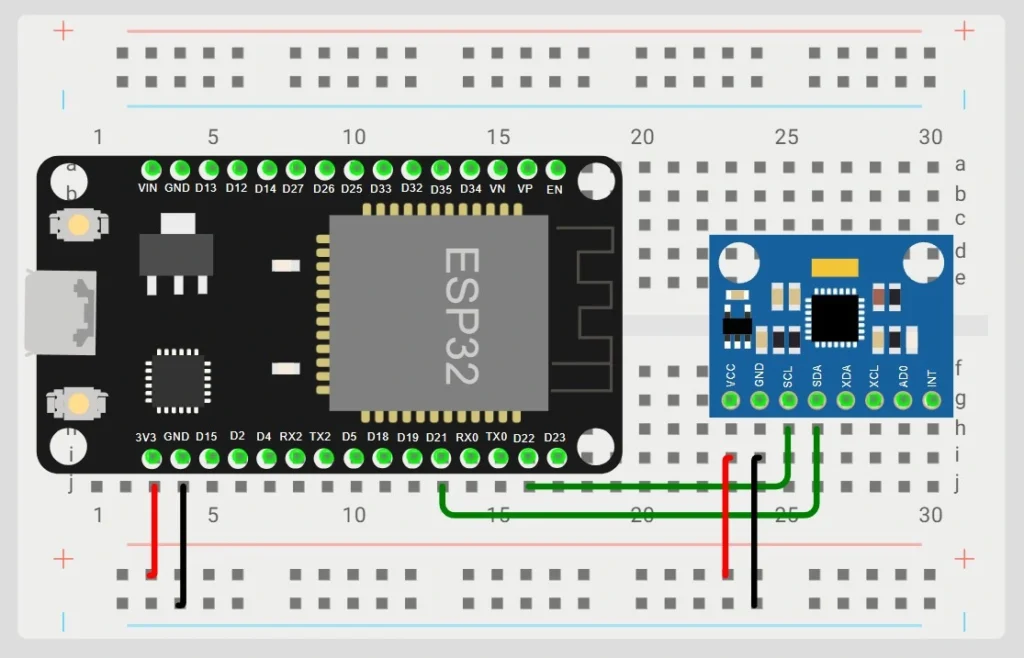
| MPU6050 Pin | ESP32 Pin |
| VCC | 3V3 (3.3V) |
| GND | GND |
| SDA | SDA (e.g., GPIO21) |
| SCL | SCL (e.g., GPIO22) |
Top 6
ESP32 eBooks
From Zero to Professional

If you want to use different SDA/SCL pins and not the default ones, make sure to specify them with Wire.begin() in the code later on.
Wire.begin(SDA_PIN, SCL_PIN);Installing Required Libraries
To make use of the MPU6050 sensor and make the step count accessible via a web server, we need to install the following libraries:
- ESPAsyncWebServer by esp32async
- AsyncTCP by esp32async
- MPU6050_light by rfetick
In the Arduino IDE, open the library manager under Sketch > Include Library > Manage Libraries… Then, search for the libraries from above and install them.
On PlatformIO, simply add the following lib_deps in your platformio.ini file:
lib_deps =
	esp32async/ESPAsyncWebServer@^3.7.7
	rfetick/MPU6050_light@^1.1.0
	esp32async/AsyncTCP@^3.4.0
Feel free to use the latest versions available. If, for some reason, a library has been updated and works a bit differently, use these versions, though, to follow along with this guide.
How Measuring the Steps Works
The MPU6050 sensor continuously tracks acceleration across all three axes (X, Y, and Z). By computing the overall magnitude of these values, we can detect when a person’s movement exceeds a defined threshold, which typically indicates walking or jogging.
To ensure accuracy and avoid multiple counts from a single step motion, we apply a time-based filter. Hence, a new step is only registered if a minimum interval (STEP_DELAY) has passed since the last one.
The resulting step count is then made accessible through a web interface, which refreshes automatically every second. For convenience, users can also reset the step counter directly from the web page.
ESP32 Step Counter Sketch
The following sketch implements the step counter and web server to display the current step count. After uploading the sketch to your ESP32, have a look at the serial monitor for the ESP32’s IP address. Also, make sure to connect to its access point before trying to access the web interface!
Top 6
Arduino eBooks
From Zero to Professional

#include <WiFi.h>
#include <AsyncTCP.h>
#include <ESPAsyncWebServer.h>
#include <Wire.h>
#include <MPU6050_light.h>

// Step counter variables
volatile unsigned long stepCount = 0;
unsigned long lastStepTime = 0;
const float ACCEL_THRESHOLD = 0.3;
const unsigned long STEP_DELAY = 300;
bool stepDetected = false;

// Sensor and server
MPU6050 mpu(Wire);
AsyncWebServer server(80);

// Webpage HTML
const char index_html[] PROGMEM = R"rawliteral(
<!DOCTYPE html>
<html>
<head>
  <meta charset='UTF-8'>
  <title>ESP32 Step Counter</title>
  <script>
    async function fetchSteps() {
      const response = await fetch('/steps');
      const steps = await response.text();
      document.getElementById('stepCount').innerText = steps;
    }
    setInterval(fetchSteps, 1000);
  </script>
</head>
<body>
  <h1>ESP32 Step Counter</h1>
  <p><strong>Steps:</strong> <span id='stepCount'>0</span></p>
  <form action='/reset' method='POST'>
    <button type='submit'>Reset Steps</button>
  </form>
</body>
</html>
)rawliteral";

void setup() {
  Serial.begin(115200);

  // Start WiFi in Access Point mode
  WiFi.softAP("ESP32-Step-Counter", "12345678");
  IPAddress IP = WiFi.softAPIP();
  Serial.print("Access Point IP address: ");
  Serial.println(IP);

  // Initialize MPU6050
  Wire.begin();
  mpu.begin();
  mpu.calcOffsets();
  Serial.println("MPU6050 ready!");

  // Web Server Routes
  server.on("/", HTTP_GET, [](AsyncWebServerRequest *request){
    request->send(200, "text/html", index_html);
  });

  server.on("/steps", HTTP_GET, [](AsyncWebServerRequest *request){
    request->send(200, "text/plain", String(stepCount));
  });

  server.on("/reset", HTTP_POST, [](AsyncWebServerRequest *request){
    stepCount = 0;
    request->redirect("/");
  });

  server.begin();
}

void loop() {
  static unsigned long lastUpdate = 0;
  mpu.update();

  // Get acceleration data
  float accelX = mpu.getAccX();
  float accelY = mpu.getAccY();
  float accelZ = mpu.getAccZ();

  float accelMagnitude = sqrt(accelX * accelX + accelY * accelY + accelZ * accelZ);

  unsigned long currentTime = millis();

  // Detect steps with acceleration threshold
  if (accelMagnitude > (1.0 + ACCEL_THRESHOLD)) {
    if (!stepDetected && (currentTime - lastStepTime > STEP_DELAY)) {
      stepCount++;
      stepDetected = true;
      lastStepTime = currentTime;
      Serial.print("Step detected! Total steps: ");
      Serial.println(stepCount);
    }
  } else {
    stepDetected = false;
  }

  delay(10);
}
ESP32 Step Counter Code Explanation
Step Counter Variables
volatile unsigned long stepCount = 0;
unsigned long lastStepTime = 0;
const float ACCEL_THRESHOLD = 0.3;
const unsigned long STEP_DELAY = 300;
bool stepDetected = false;
We need to store several values to detect and count steps. The variable stepCount counts the steps that were detected, lastStepTime and STEP_DELAY help avoid counting multiple steps from a single motion, and ACCEL_THRESHOLD is the threshold used to detect a step.
If you want your step counter to be more or less sensitive, adjust the ACCEL_THRESHOLD value.
Wi-Fi Access Point Setup
  WiFi.softAP("ESP32-Step-Counter", "12345678");
  IPAddress IP = WiFi.softAPIP();
  Serial.print("Access Point IP address: ");
  Serial.println(IP);
We configure the ESP32 to create its own Wi-Fi network. This way, we can connect to it from our phone without the need for a different Wi-Fi network.
In this case, the SSID of the ESP32’s network is “ESP32-Step-Counter” and the password is “12345678“.
MPU6050 Sensor Initialization
Wire.begin();
mpu.begin();
mpu.calcOffsets();
With these three lines of code, we initialize and calibrate the MPU6050 sensor.
Web Server Routes & HTML Page
Next, we define three routes:
- /: serves the main HTML page
- /steps: Returns the current step count
- /reset: Resets the counter and redirects to the main page
The HTML page is stored in index_html[] and uses JavaScript to fetch and update the step count every second. In addition, a button is available to reset the count.
Detect Steps in loop()
The loop() function continuously reads the acceleration data from the MPU6050 and checks for steps exceeding our threshold.
  mpu.update();

  float accelX = mpu.getAccX();
  float accelY = mpu.getAccY();
  float accelZ = mpu.getAccZ();
First, we update the sensor readings and get the current acceleration on each axis.
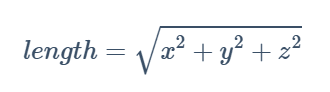
float accelMagnitude = sqrt(accelX * accelX + accelY * accelY + accelZ * accelZ);Then, we calculate the total acceleration magnitude using the formula for the length of a three-dimensional vector.
  if (accelMagnitude > (1.0 + ACCEL_THRESHOLD)) {
    if (!stepDetected && (currentTime - lastStepTime > STEP_DELAY)) {
      stepCount++;
      stepDetected = true;
      lastStepTime = currentTime;
      Serial.print("Step detected! Total steps: ");
      Serial.println(stepCount);
    }
  } else {
    stepDetected = false;
  }
This logic detects a step when the total acceleration exceeds a threshold (normal gravity ~1g plus our threshold variable), and enough time (STEP_DELAY) has passed since the last step to avoid counting the same motion multiple times. The stepDetected flag prevents double-counting during one-step movement.
delay(10);The small delay at the end reduces CPU usage and provides sensor stability.
Improvements / Ideas
Here are some ideas about how you can improve and build upon this project:
- Improve the step detection with filtering.
- Serve live updates using the WebSocket instead of periodic fetching
- Save the step count in EEPROM or SPIFFS
- Add battery power for a portable tracker
- Add an LCD or other display to show the step count
Conclusion
You now have a working wireless step counter/pedometer. Together with the ESP32-C3 Super Mini, you can build a full wearable fitness tracker in a compact form factor.
Share your experience with the MPU6050 in the comments below!
Thanks for reading!
Links marked with an asterisk (*) are affiliate links, which means we may receive a commission for purchases made through these links at no extra cost to you. Read more on our Affiliate Disclosure Page.
🚀 Discover the world of electronics and innovation!
✨ Create, program, and experiment with all your creative ideas with ease.
🔥 Don't wait! Browse SpotPear products now and start your amazing project!



![ESP32 IR Receiver: How To Detect IR Remote Signals [Arduino IDE]](https://ebokify.com/wp-content/uploads/2026/01/ESP32-IR-Receiver-How-To-Detect-IR-Remote-Signals-Arduino-IDE-1-768x512.webp "ESP32 IR Receiver: How To Detect IR Remote Signals [Arduino IDE] 10")