

Wait! Don’t Go Yet! 👋
Become a Member Today and Unlock Access to All eBooks! 😍
Thousands of eBooks at your fingertips. Read, learn, and grow anytime, anywhere ✨
Become a Member Today and Unlock Access to All eBooks! 😍
Thousands of eBooks at your fingertips. Read, learn, and grow anytime, anywhere ✨

Real-time clocks (RTC) are essential for applications that require accurate timekeeping, even when a device is powered off or in deep sleep mode. The ESP32 does not have a built-in RTC with battery backup, so using an external RTC module is a great way to maintain accurate time.
In this guide, you will learn how to use the DS3231 and DS1307 RTC modules with the EPS32 in the Arduino IDE.
Some projects require keeping track of the time even while the microcontroller is powered off or in deep sleep mode. For instance, this could be the case in a smart home device that shuts the roller blinds at a specific time.
If the device runs on a battery, it is even more useful to use an RTC module like the DS3231 that can wake up the ESP32 from deep sleep so that the device does not consume too much power unnecessarily.
The DS3231 module uses a temperature-compensated crystal oscillator, providing high accuracy. Additionally, it supports alarm functions, which can be used to wake up the ESP32 from deep sleep mode.
The DS1307 module uses a standard 32.768 kHz crystal oscillator, which makes it slightly less accurate than the DS3231. Also, the DS1307 does not support alarm functions for wake-up.
All in all, I would go for the DS3231 as it offers more accuracy and alarm functionality. However, if you’re looking for a more budget-friendly module and don’t need the extra accuracy and functionality, go with the cheaper DS1307.
Top 6
ESP32 eBooks
From Zero to Professional

To follow along with this guide and interface your RTC module with the ESP32, you need the following components:
Feel free to use my affiliate links if you are looking to buy any of the parts. I will get a small commission for helping this site at no extra cost to you!
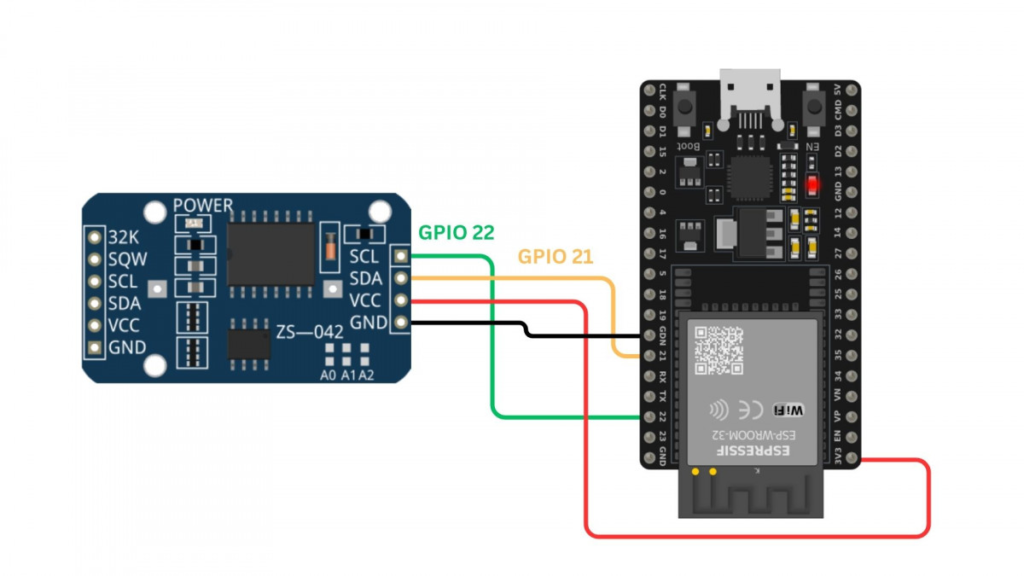
Wiring the RTC module to the ESP32 is very easy and pretty much the same for both the DS1307 and DS3231.
| RTC Module Pin | ESP32 Pin |
| VCC | 3.3V (5V for some RTC modules) |
| GND | GND |
| SDA | SCL (e.g., GPIO 22) |
| SCL | SCL (e.g. GPIO 22) |
If you want to use the wake-up functionality of the DS3231, also hook up the module’s SQW pin to one of the pins on the ESP32 that supports wake-ups (e.g., pin 2)
Reading the time on the ESP32 from a DS RTC module is very easy. We simply need to initialize the RTC module with rtc.begin() and read the current date and time with rtc.now().
If you haven’t set the time on your RTC module yet or it is incorrect, use rtc.adjust() to set the correct time.
#include <Wire.h>
#include <RTClib.h>

RTC_DS3231 rtc; // Use RTC_DS1307 rtc if using DS1307

void setup() {
  Serial.begin(115200);
  if (!rtc.begin()) { // init RTC module
    Serial.println("Couldn't find RTC");
    while (1);
  }

  //rtc.adjust(DateTime(F(__DATE__), F(__TIME__))); // use this to set the time
}

void loop() {
  DateTime now = rtc.now();
  Serial.print(now.year(), DEC);
  Serial.print('/');
  Serial.print(now.month(), DEC);
  Serial.print('/');
  Serial.print(now.day(), DEC);
  Serial.print(" ");
  Serial.print(now.hour(), DEC);
  Serial.print(':');
  Serial.print(now.minute(), DEC);
  Serial.print(':');
  Serial.print(now.second(), DEC);
  Serial.println();
  delay(1000);
}
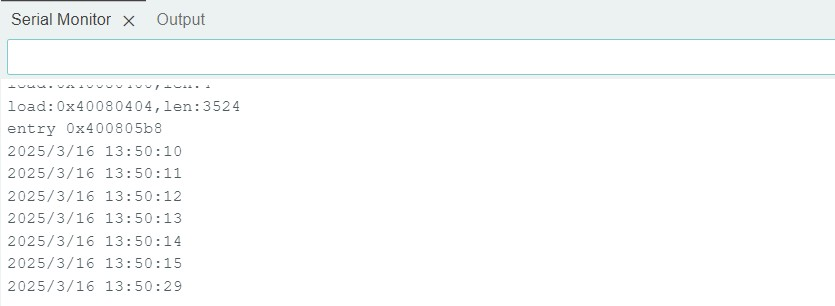
After uploading the sketch, observe your serial monitor for the results!
Top 6
Arduino eBooks
From Zero to Professional

The DS3231 RTC module can be used for interrupts at a set time. This is useful for waking the ESP32 from deep sleep.
To use this functionality, connect the SQW pin of the DS3231 module to a GPIO pin on your ESP and adjust the sketch as follows:
#include <Wire.h>
#include <RTClib.h>
#include "esp_sleep.h"

RTC_DS3231 rtc;
#define WAKE_UP_PIN 2

void setup() {
  Serial.begin(115200);
  pinMode(WAKE_UP_PIN, INPUT_PULLUP);

  if (!rtc.begin()) {
    Serial.println("Couldn't find RTC");
    while (1);
  }

  rtc.disable32K(); // disable 32kHz output
  rtc.writeSqwPinMode(DS3231_OFF); // Use SQW-Pin as alarm interrupt
  rtc.clearAlarm(1);
  rtc.clearAlarm(2);

  // Set alarm in 10 seconds
  DateTime alarmTime = rtc.now() + TimeSpan(0, 0, 0, 10);
  rtc.setAlarm1(alarmTime, DS3231_A1_Second);

  Serial.println("Alarm set in 10 seconds.");
  esp_sleep_enable_ext0_wakeup((gpio_num_t)WAKE_UP_PIN, LOW);

  Serial.println("Going to sleep...");
  esp_deep_sleep_start();
}

void loop() {}For the DS3231 RTC module, you can check if the module is running on backup power with the following code snippet:
if (rtc.lostPower()) {
  Serial.println("RTC is running on backup battery.");
}
If you are using the DS1307, you cannot check the backup battery status directly. However, you can check if the clock is running.
if (!rtc.isrunning()) {
  Serial.println("RTC is not running, check backup battery.");
}Using an RTC module like the DS3231 or the DS1307 with the ESP32 provides accurate timekeeping in your projects, even when the board is powered off or in deep sleep.
The DS3231 is the better choice for projects that need high accuracy and alarm-based wake-up, while the DS1307 is helpful for simple applications.
Also, check out how to retrieve the current time without any additional hardware via NTP!
Got any questions? Feel free to share them in the comments below!
Thanks for reading!
Links marked with an asterisk (*) are affiliate links, which means we may receive a commission for purchases made through these links at no extra cost to you. Read more on our Affiliate Disclosure Page.
🚀 Discover the world of electronics and innovation!
✨ Create, program, and experiment with all your creative ideas with ease.
🔥 Don't wait! Browse SpotPear products now and start your amazing project!