

Wait! Don’t Go Yet! 👋
Become a Member Today and Unlock Access to All eBooks! 😍
Thousands of eBooks at your fingertips. Read, learn, and grow anytime, anywhere ✨
Become a Member Today and Unlock Access to All eBooks! 😍
Thousands of eBooks at your fingertips. Read, learn, and grow anytime, anywhere ✨

Having trouble detecting your I2C devices and finding out their addresses?
In this quick guide, I’ll show you how to properly connect your I2C modules and build an ESP32 I2C Scanner to find out their addresses for this popular communication protocol.
Run the following sketch on your ESP32 to search for connected I2C devices and print their addresses. The sketch will scan every 15 seconds, so you can connect new devices while it runs.
#include <Wire.h>

void setup() {
  Wire.begin(); // use Wire.begin(SDA_PIN, SCL_PIN); for custom I2C pins
  Serial.begin(115200);
  Serial.println("\nI2C Scanner Running...");
}

void loop() {
  byte error, address;
  int devices = 0;

  for (address = 1; address < 127; address++) {
    Wire.beginTransmission(address);
    error = Wire.endTransmission();

    if (error == 0) {
      Serial.print("I2C device found at address 0x");
      if (address < 16)
        Serial.print("0");
      Serial.println(address, HEX);
      devices++;
    }
  }

  if (devices == 0)
    Serial.println("No I2C devices found.\n");
  else
    Serial.println("Scan complete.\n");

  delay(15000); // Wait 15 seconds before the next scan
}
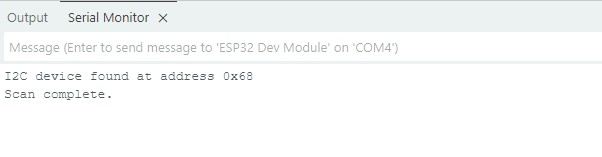
Watch the serial monitor (115200 baud) for all the I2C devices your ESP32 has discovered. The list will be updated every 15 seconds.
Top 6
ESP32 eBooks
From Zero to Professional

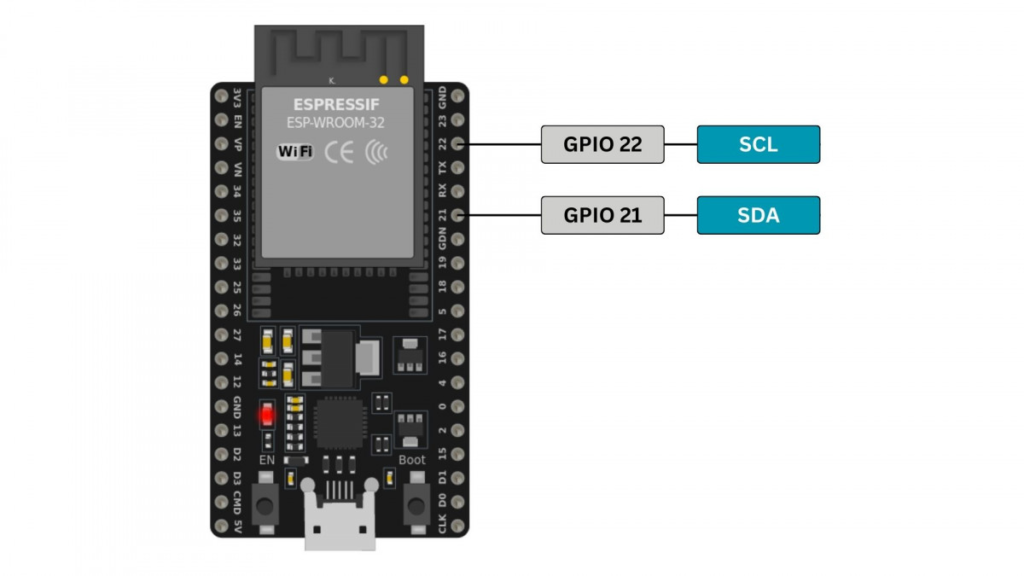
By default, the ESP32 uses GPIO pin 22 for the SCL line and GPIO pin 21 for the SDA line. However, the location of these pins on the development board may vary depending on the board you use.
You can also configure the ESP32 to use different GPIOs. To do so, specify the desired GPIO pins in the sketch as follows:
Wire.begin(SDA_PIN, SCL_PIN);Make sure to connect the SCL pin on the I2C module to the SCL pin of the ESP32. The same thing applies to the SDA pin as well.
You can connect multiple devices on the same SDA/SCL line. Just make sure there’s no address conflict between devices.
Here’s a list of the addresses of some of the most popular I2C devices, so you don’t have to find them out yourself.
| Device Type | Example Device | 7-bit (HEX) Address |
| EEPROM | AT24C32 | 0x50 |
| RTC | DS3231 | 0x68 |
| Temperature Sensor | LM75 | 0x48 |
| Accelerometer | ADXL345 | 0x53 |
| Gyroscope | MPU-6050 | 0x68 or 0x69 |
| OLED Display | SSD1306 | 0x3C or 0x3D |
| GPIO Expander | PCF8574 | 0x20 or 0x27 |
| Light Sensor | BH1750 | 0x23 or 0x5C |
| Barometric Sensor | BMP280 | 0x76 or 0x77 |
| Digital Potentiometer | MCP4725 | 0x60 |
Follow this troubleshooting guideline in case your ESP32 I2C scanner doesn’t recognize any devices:
Nothing shows up? Check the wiring and make sure SDA/SCL are connected correctly.
Still no devices? Try different GPIO pins using “Wire.begin(SDA_PIN, SCL_PIN);“.
Multiple devices connected? Make sure there’s no address conflict between devices with the same I2C address. Each device on the bus must have a unique address. If two devices share the same address, communication can fail. Refer to your device datasheets to configure different addresses if possible.
Top 6
Arduino eBooks
From Zero to Professional

Still stuck? Some I2C modules need additional pull-up resistors on SDA and SCL. Try adding an external pull-up resistor (typically 4.7kΩ to 10kΩ) between the SDA/SCL pins of the I2C device and the 3.3V line.
With this simple ESP32 I2C scanner, you can now quickly identify and connect I2C devices in your projects. It’s an essential tool for anyone working with I2C sensors or other modules.
Still having trouble? Let me know in the comments below!
Thanks for reading!
Links marked with an asterisk (*) are affiliate links, which means we may receive a commission for purchases made through these links at no extra cost to you. Read more on our Affiliate Disclosure Page.
🚀 Discover the world of electronics and innovation!
✨ Create, program, and experiment with all your creative ideas with ease.
🔥 Don't wait! Browse SpotPear products now and start your amazing project!