

Wait! Don’t Go Yet! 👋
Become a Member Today and Unlock Access to All eBooks! 😍
Thousands of eBooks at your fingertips. Read, learn, and grow anytime, anywhere ✨
Become a Member Today and Unlock Access to All eBooks! 😍
Thousands of eBooks at your fingertips. Read, learn, and grow anytime, anywhere ✨

This project combines an Arduino-controlled ultrasonic sensor with a servo motor to scan for and measure the distance to nearby objects. The collected data is then visualised on your computer as a live, graphical radar screen using the Processing environment.
This project details the construction of a simple yet effective 2D ultrasonic radar system. It serves as a classic introductory project that seamlessly bridges the gap between physical hardware and software-based data visualisation. The system uses an Arduino microcontroller to control a sweeping ultrasonic sensor that detects the presence and distance of objects within a 180-degree field of view. This spatial data is then transmitted to a computer and rendered in real time as an intuitive graphical radar display using the Processing development environment.
The final output is a visually satisfying and functional device that mimics the principles of real-world sonar and radar systems, providing a tangible representation of its surroundings.
Distance=(Speed of Sound×Time)/2
The result is a pair of data points: the current angle of the servo and the calculated distance.
Serial Communication: The Arduino formats this angle and distance data into a string and transmits it to the computer via the USB serial port.
Data Visualisation: On the computer, a sketch running in the Processing environment continuously listens to the serial port. When it receives the data string from the Arduino, it parses the angle and distance values. Using trigonometry, it converts these polar coordinates into Cartesian (x, y) points to plot on the screen, creating a visual map of any detected objects relative to the sensor's position.
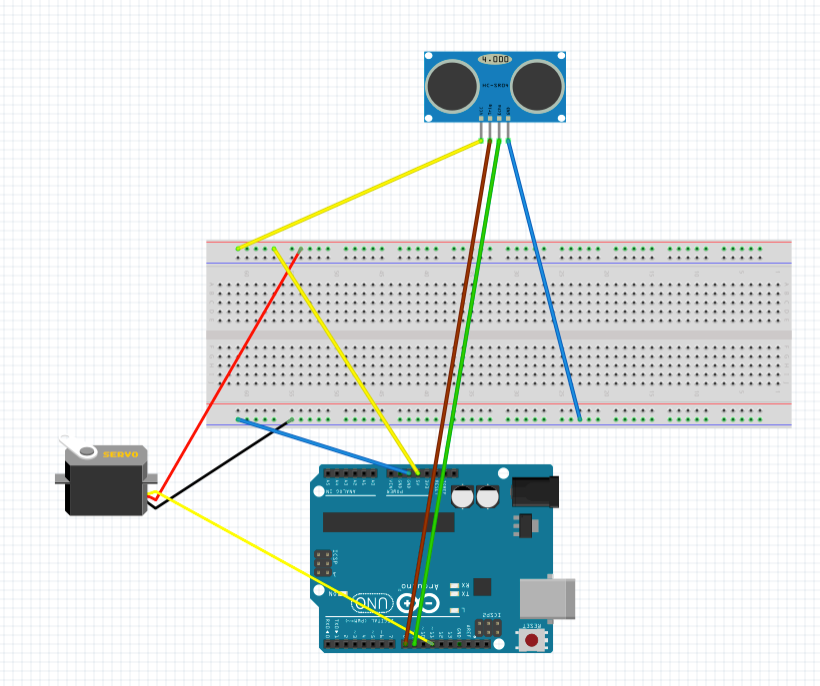
1#include <Servo.h>
2
3// --- Pin Definitions ---
4const int SERVO_PIN = 11;
5const int TRIG_PIN = 8;
6const int ECHO_PIN = 9;
7
8// --- Constants for Servo ---
9const int MIN_ANGLE = 0;
10const int MAX_ANGLE = 180;
11const int ANGLE_STEP = 1;
12const int SWEEP_DELAY = 15; // Delay between servo movements in milliseconds
13
14// --- Constants for Ultrasonic Sensor ---
15// The speed of sound is 343 m/s or 29.1 microseconds per centimeter.
16// The pulseIn() function measures the round trip time.
17// So, the distance in cm is (duration / 2) / 29.1 = duration / 58.2
18const float SOUND_SPEED_FACTOR = 58.2;
19
20Servo myServo;
21
22void setup() {
23  pinMode(TRIG_PIN, OUTPUT);
24  pinMode(ECHO_PIN, INPUT);
25  myServo.attach(SERVO_PIN);
26  Serial.begin(9600);
27}
28
29void loop() {
30  // Sweep from MIN_ANGLE to MAX_ANGLE
31  sweepAndMeasure(MIN_ANGLE, MAX_ANGLE, ANGLE_STEP);
32
33  // Sweep back from MAX_ANGLE to MIN_ANGLE
34  sweepAndMeasure(MAX_ANGLE, MIN_ANGLE, -ANGLE_STEP);
35}
36
37/**
38 * @brief Sweeps the servo motor and measures the distance at each step.
39 * @param startAngle The starting angle of the sweep.
40 * @param endAngle The ending angle of the sweep.
41 * @param step The increment or decrement for the angle.
42 */
43void sweepAndMeasure(int startAngle, int endAngle, int step) {
44  for (int angle = startAngle; (step > 0) ? (angle <= endAngle) : (angle >= endAngle); angle += step) {
45    myServo.write(angle);
46    delay(SWEEP_DELAY);
47    int distance = calculateDistance();
48    printData(angle, distance);
49  }
50}
51
52/**
53 * @brief Calculates the distance using the ultrasonic sensor.
54 * @return The calculated distance in centimeters.
55 */
56int calculateDistance() {
57  // Trigger the ultrasonic sensor
58  digitalWrite(TRIG_PIN, LOW);
59  delayMicroseconds(2);
60  digitalWrite(TRIG_PIN, HIGH);
61  delayMicroseconds(10);
62  digitalWrite(TRIG_PIN, LOW);
63
64  // Read the echo pulse
65  long duration = pulseIn(ECHO_PIN, HIGH);
66
67  // Calculate the distance in centimeters
68  return static_cast<int>(duration / SOUND_SPEED_FACTOR);
69}
70
71/**
72 * @brief Prints the angle and distance data to the Serial Monitor.
73 * @param angle The current angle of the servo.
74 * @param distance The measured distance.
75 */
76void printData(int angle, int distance) {
77  Serial.print(angle);
78  Serial.print(",");
79  Serial.print(distance);
80  Serial.print(".");
81}
1# Processing (Python) code for a Radar Display
2# This script reads angle and distance data from an Arduino over the serial port
3# and visualizes it as a classic radar screen.
4#
5# MODIFIED to use a rectangular, half-screen layout.
6
7add_library('serial')
8
9# --- Global Variables ---
10serial_port = None # The serial port object
11font = None # Font for displaying text
12in_string = "" # String to buffer data from serial
13
14# CHANGED: Use rectangular screen dimensions
15screen_width = 800
16screen_height = 450 # Half the original height with some padding
17
18# Radar screen properties
19radar_radius = 350
20# CHANGED: Center coordinates are now relative to the new rectangular screen
21radar_center_x = screen_width / 2
22# Position the radar's baseline near the bottom of the window
23radar_center_y = screen_height - 100
24
25# Data from Arduino
26current_angle = 0
27current_distance = 0
28
29# Data storage for drawing points
30point_history = []
31
32def setup():
33 """
34 This function runs once when the program starts.
35 It sets up the display window, initializes the serial communication,
36 and loads the font.
37 """
38 global serial_port, font
39
40 # --- Window and Graphics Setup ---
41 # CHANGED: Use the new rectangular dimensions
42 size(screen_width, screen_height)
43 smooth()
44
45 # Create a font for text display.
46 font = createFont("Monospaced", 20)
47 textFont(font)
48
49 # --- Serial Communication Setup ---
50 print("Available Serial Ports:")
51 print(Serial.list())
52
53 # ---!!! IMPORTANT: YOU MUST USE THE CORRECT PORT NAME !!!---
54 port_name = "/dev/cu.usbmodem11101"
55
56 try:
57 print("Connecting to port: {}".format(port_name))
58 serial_port = Serial(this, port_name, 9600)
59 serial_port.clear()
60
61 except Exception as e:
62 print("Error opening serial port: {}".format(e))
63 print("Please make sure the port name is correct and the Arduino is plugged in.")
64 print("Also ensure the Arduino IDE's Serial Monitor is closed.")
65 exit()
66
67
68def draw():
69 """
70 This function runs continuously in a loop, redrawing the screen
71 in each frame.
72 """
73 global current_angle, current_distance
74 background(0, 20, 0)
75 draw_radar_grid()
76 draw_text_labels()
77 draw_sweep_line(current_angle)
78 draw_detected_points()
79 update_and_draw_history()
80
81
82def draw_radar_grid():
83 """Draws the concentric semi-circles and lines of the radar."""
84 stroke(0, 150, 0)
85 noFill()
86 strokeWeight(2)
87
88 # Draw 2 concentric semi-circles for the top-half display
89 for i in range(1, 3):
90 radius = i * (radar_radius / 2.0)
91 # Use arc() to draw only the top half of the circle (from PI to TWO_PI)
92 arc(radar_center_x, radar_center_y, radius * 2, radius * 2, PI, TWO_PI)
93
94 # Draw the horizontal closing line for the semi-circle display
95 line(radar_center_x - radar_radius, radar_center_y, radar_center_x + radar_radius, radar_center_y)
96
97 # Draw 5 radial lines for the 180-degree sweep (left-to-right)
98 for i in range(5):
99 angle = radians((i * 45) - 180)
100 x2 = radar_center_x + radar_radius * cos(angle)
101 y2 = radar_center_y + radar_radius * sin(angle)
102 line(radar_center_x, radar_center_y, x2, y2)
103
104
105def draw_text_labels():
106 """Displays text information on the screen."""
107 fill(0, 200, 0)
108 noStroke()
109 # Label the 2 rings along the horizontal axis
110 for i in range(1, 3):
111 radius_text = i * (radar_radius / 2.0)
112 text(str(i * 10) + " cm", radar_center_x + radius_text + 5, radar_center_y - 5)
113
114 text("Angle: {} deg".format(current_angle), 20, 40)
115 text("Distance: {} cm".format(current_distance), 20, 70)
116 text("Radar Display", width / 2 - 80, 40)
117
118
119def draw_sweep_line(angle):
120 """Draws the moving line that sweeps across the radar."""
121 stroke(0, 255, 0, 150)
122 strokeWeight(3)
123 rad_angle = radians(angle - 180)
124 end_x = radar_center_x + radar_radius * cos(rad_angle)
125 end_y = radar_center_y + radar_radius * sin(rad_angle)
126 line(radar_center_x, radar_center_y, end_x, end_y)
127
128
129def draw_detected_points():
130 """Draws a point on the radar for the current detection."""
131 max_dist = 20.0
132 if current_distance > 0 and current_distance < max_dist:
133 stroke(255, 0, 0)
134 strokeWeight(5)
135 rad_angle = radians(current_angle - 180)
136 mapped_dist = map(current_distance, 0, max_dist, 0, radar_radius)
137 point_x = radar_center_x + mapped_dist * cos(rad_angle)
138 point_y = radar_center_y + mapped_dist * sin(rad_angle)
139 point(point_x, point_y)
140 point_history.append({'x': point_x, 'y': point_y, 'age': 255})
141
142def update_and_draw_history():
143 """Draws and fades out old points to create a trail effect."""
144 global point_history
145 new_history = []
146 for p in point_history:
147 stroke(0, p['age'], 0)
148 strokeWeight(4)
149 point(p['x'], p['y'])
150 p['age'] -= 2
151 if p['age'] > 0:
152 new_history.append(p)
153 point_history = new_history
154
155
156def serialEvent(port):
157 """
158 This function is automatically called by Processing whenever new data is available.
159 """
160 global in_string, current_angle, current_distance
161
162 while port.available() > 0:
163 in_char = port.readChar()
164 if in_char == '.':
165 values = in_string.split(',')
166 if len(values) == 2:
167 try:
168 angle = int(values[0])
169 distance = int(values[1])
170 current_angle = angle
171 current_distance = distance
172 except ValueError:
173 pass
174 in_string = ""
175 else:
176 if in_char != '\n' and in_char != '\r':
177 in_string += in_char🚀 Discover the world of electronics and innovation!
✨ Create, program, and experiment with all your creative ideas with ease.
🔥 Don't wait! Browse SpotPear products now and start your amazing project!

I’ll make it