Book Categories:


Wait, don't go!
Become a Member Today and Unlock Access to All eBooks!
Thousands of eBooks at your fingertips. Read, learn, and grow anytime, anywhere.
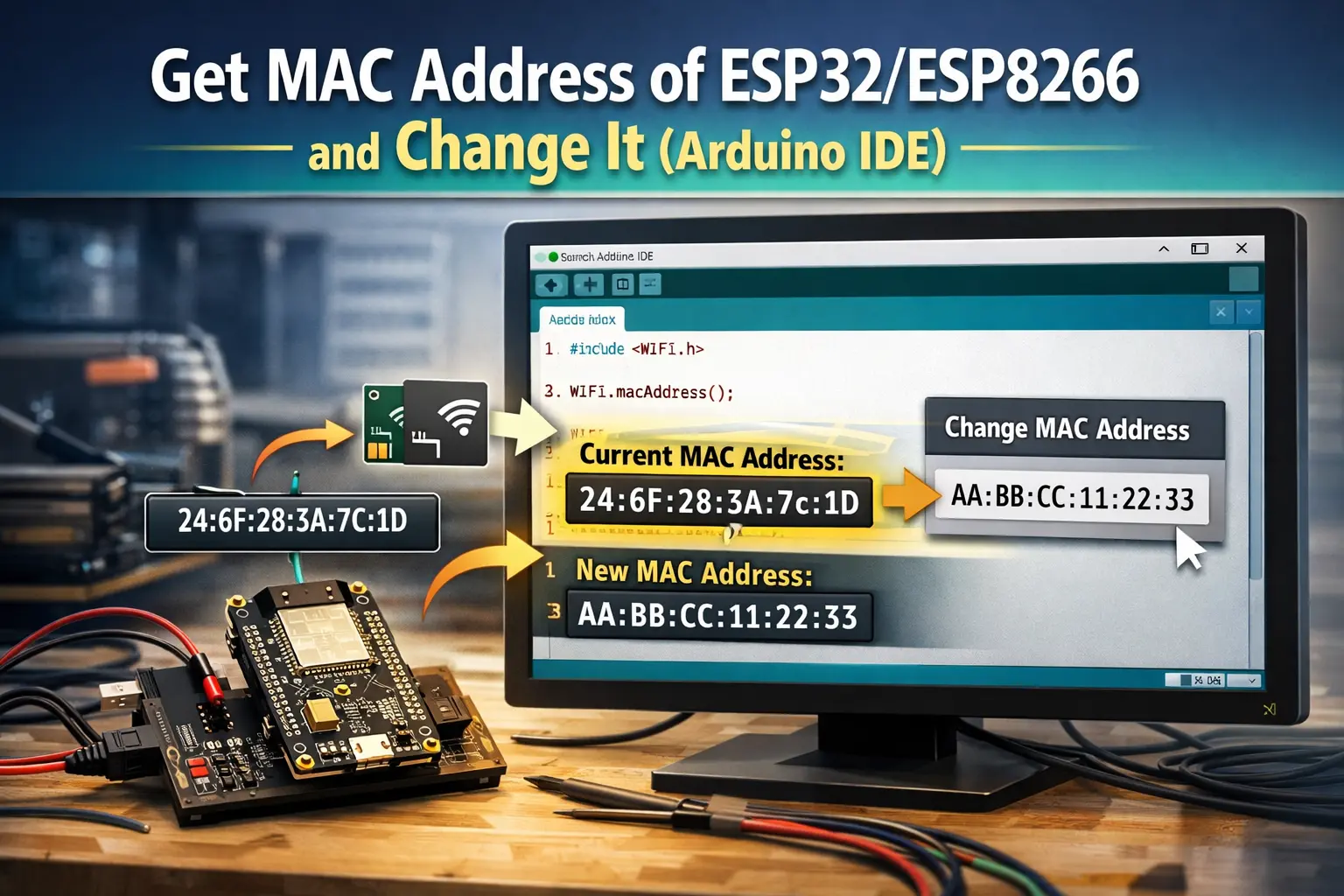
Using the Arduino IDE, this guide shows how to get the MAC address of ESP32/ESP8266 boards. We also show you how to change the MAC address of your board.
A MAC Address, which stands for Media Access Control Address, is a hardware unique identifier that identifies each network device.
MAC Addresses are made up of six groups of two hexadecimal digits separated by colons, for example, 30:AE:A4:07:0D:64.
MAC addresses are assigned by manufacturers; however, you may also assign a custom MAC address to your board. However, each time the board is reset, it returns to its original MAC Address. So, in every sketch, you need to add the code to set a custom MAC Address.
Simply upload the following code to the ESP32 or ESP8266 to get your board's MAC Address; the code is compatible with both boards.
// Complete Instructions to Get and Change ESP MAC Address: https://ebokify.com/get-change-esp32-esp8266-mac-address-arduino/

#ifdef ESP32
  #include <WiFi.h>
#else
  #include <ESP8266WiFi.h>
#endif

void setup(){
  Serial.begin(115200);
  Serial.println();
  Serial.print("ESP Board MAC Address:  ");
  Serial.println(WiFi.macAddress());
}

void loop(){

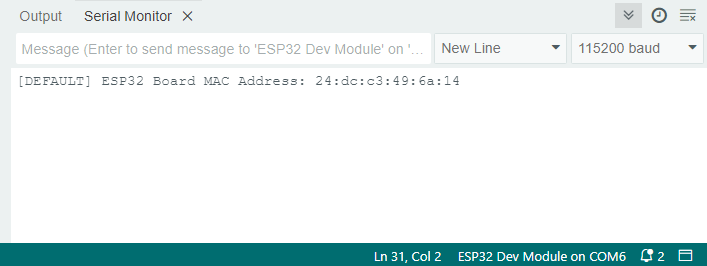
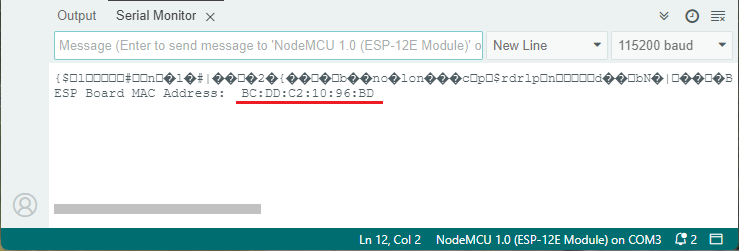
}After uploading the code, open the Serial Monitor at a 115200 baud rate. Press the RESET or EN button on the board.

As shown in the following figure, the MAC Address should be printed on the Serial Monitor.
That's all! You now know how to get the MAC Address of ESP32/ESP8266 board.
Giving your boards a custom MAC Address may be useful in various situations. However, as previously indicated, this does not overwrite the MAC Address set by the manufacturer. As a result, every time you reset the board or upload a new code, it returns to its default MAC Address.
The following code sets a custom MAC Address for the ESP32 board.
// Complete Instructions: https://ebokify.com/get-change-esp32-esp8266-mac-address-arduino/

#include <WiFi.h>
#include <esp_wifi.h>

// Set your new MAC Address
uint8_t newMACAddress[] = {0x32, 0xAE, 0xA4, 0x07, 0x0D, 0x66};

void setup(){
  Serial.begin(115200);
  Serial.println();

  WiFi.mode(WIFI_STA);

  Serial.print("[OLD] ESP32 Board MAC Address:  ");
  Serial.println(WiFi.macAddress());

  // ESP32 Board add-on before version < 1.0.5
  //esp_wifi_set_mac(ESP_IF_WIFI_STA, &newMACAddress[0]);

  // ESP32 Board add-on after version > 1.0.5
  esp_wifi_set_mac(WIFI_IF_STA, &newMACAddress[0]);

  Serial.print("[NEW] ESP32 Board MAC Address:  ");
  Serial.println(WiFi.macAddress());
}

void loop(){

}
You can set a custom MAC Address in the following line:
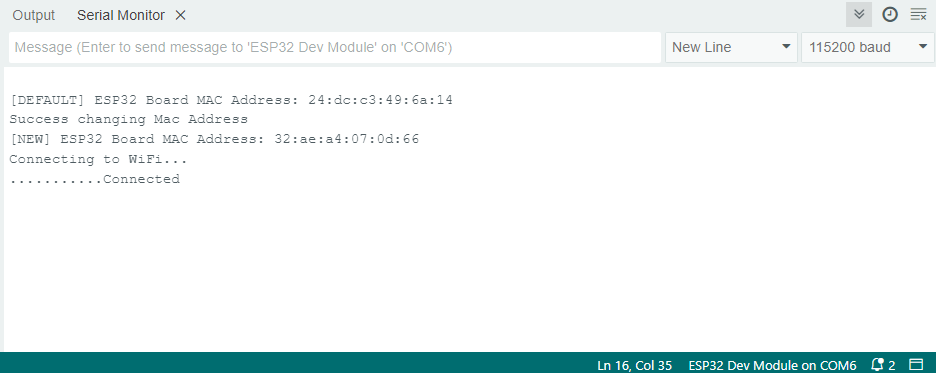
uint8_t newMACAddress[] = {0x32, 0xAE, 0xA4, 0x07, 0x0D, 0x66};After uploading the code, open the Serial Monitor at a 115200 baud rate. When you restart the ESP32, you should see its old and new MAC addresses.
The following code sets a custom MAC Address for the ESP8266 board.
// Complete Instructions: https://ebokify.com/get-change-esp32-esp8266-mac-address-arduino/

#include <ESP8266WiFi.h>

// Set your new MAC Address
uint8_t newMACAddress[] = {0x32, 0xAE, 0xA4, 0x07, 0x0D, 0x66};

void setup(){
  Serial.begin(115200);
  Serial.println();

  WiFi.mode(WIFI_STA);

  Serial.print("[OLD] ESP8266 Board MAC Address:  ");
  Serial.println(WiFi.macAddress());

  // For Soft Access Point (AP) Mode
  //wifi_set_macaddr(SOFTAP_IF, &newMACAddress[0]);
  // For Station Mode
  wifi_set_macaddr(STATION_IF, &newMACAddress[0]);

  Serial.print("[NEW] ESP8266 Board MAC Address:  ");
  Serial.println(WiFi.macAddress());
}

void loop(){

}
Set your custom MAC Address on the following line:
uint8_t newMACAddress[] = {0x32, 0xAE, 0xA4, 0x07, 0x0D, 0x66};After uploading the code, open the Serial Monitor at a 115200 baud rate. When you restart the ESP8266, you should see its old and new MAC addresses.
We've shown you how to get your ESP32 and ESP8266 manufacturer's MAC address using the Arduino IDE in this quick guide. You've also learned how to set a custom MAC Address for your boards.
If you like ESP8266, you may also like:
We hope you find this tutorial useful. Thanks for reading.


![ESP32 IR Receiver: How To Detect IR Remote Signals [Arduino IDE]](https://ebokify.com/wp-content/uploads/2026/01/ESP32-IR-Receiver-How-To-Detect-IR-Remote-Signals-Arduino-IDE-1-768x512.webp "ESP32 IR Receiver: How To Detect IR Remote Signals [Arduino IDE] 11")