Book Categories:
Wait, don't go!
Become a Member Today and Unlock Access to All eBooks!
Thousands of eBooks at your fingertips. Read, learn, and grow anytime, anywhere.

The ESP32 is a powerful microcontroller widely used in IoT and embedded systems projects, but choosing the right power source might be a challenge for beginners.
Which Pin allows which voltage? Is it okay to power the ESP32 with a power bank?
In this article, we will have a look at powering the ESP32 via USB, the VIN pin, and the 3V3 pin with external power sources like batteries. Also, I will answer some of the most common questions.
Most ESP32 development boards come with a built-in USB-C or micro-USB port, allowing them to be powered directly via a micro-USB or USB-C cable. This is the most convenient method, as it allows for both power and programming.
Also, you generally don’t have to worry about the voltage supplied to your ESP32, as the USB standard is 5V. Even modern Quick Charge (QC) ports will only provide the ESP32 with 5V, even though they can supply 9V or 12V as well.
However, be aware that this is only true for USB ports of computers, or proper power adapters/power banks that stick to the USB standard.

The VIN pin (sometimes labeled V5 or V5.0) can be used to power the ESP32 with an external regulated 5V DC power source, such as a battery pack or a voltage regulator.
To power the ESP32 via the VIN pin, connect the positive (red) wire of your 5V power source to the VIN pin and the ground (black) wire to the GND pin.
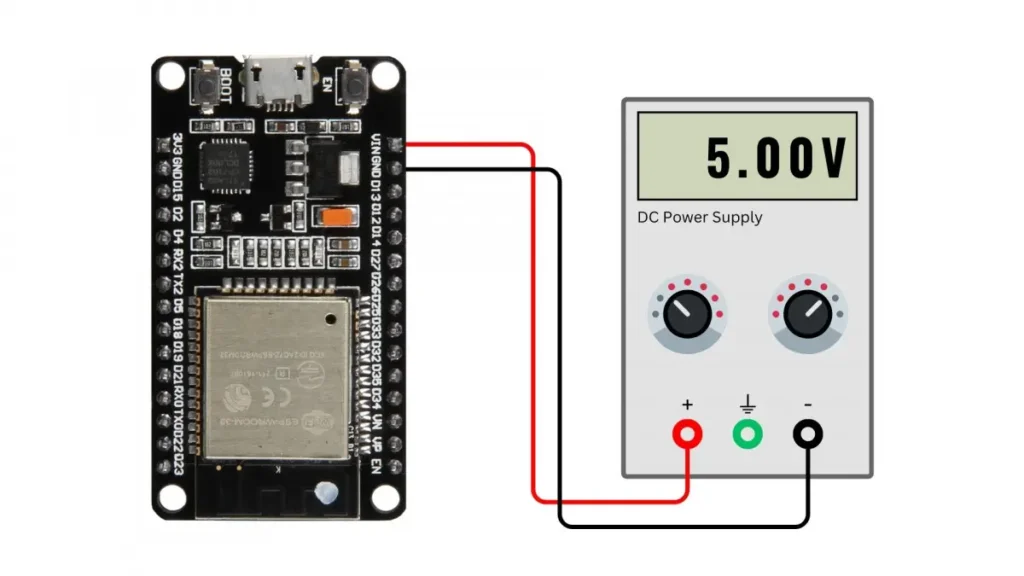
However, be extremely careful when connecting an external power source, as too much voltage can fry your ESP32. This happened to me more than once.
If you supply less than 5V, you won’t break anything, but the ESP32 won’t function properly.
The ESP32 has a 3.3V power rail, which can be used for direct power input. So, similar to the VIN pin, you can power your ESP32 development board via the 3V3 pin.
This method requires a regulated 3.3V power supply, such as an LDO voltage regulator* or a buck converter*.
Top 6
Arduino eBooks
From Zero to Professional
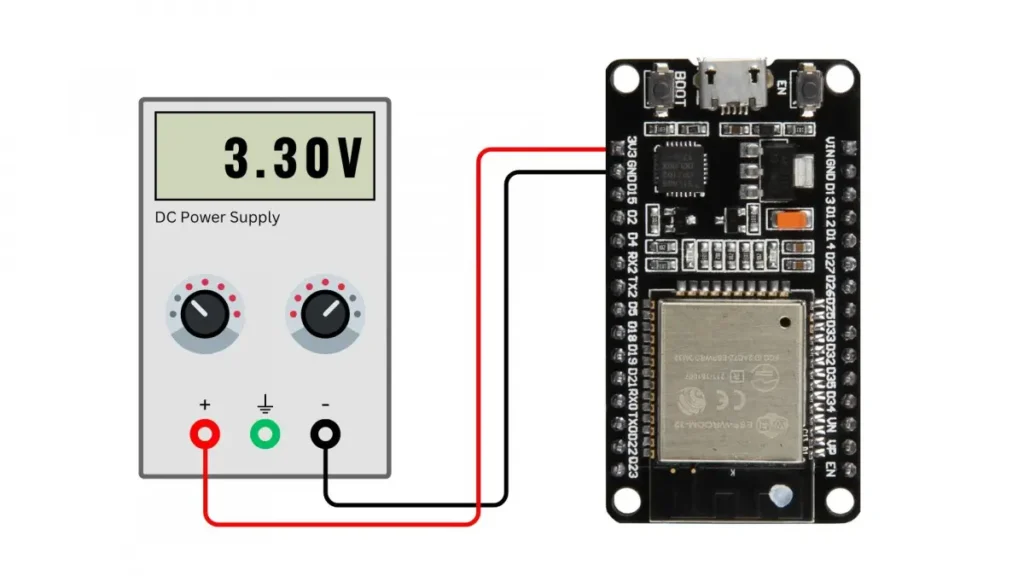
Again, be careful when connecting a power source to the 3V3 pin, as it might fry your board if the voltage is too high.
Using batteries to power the ESP32 makes it suitable for portable applications. Depending on the voltage of your battery, you may need to use a buck-boost converter to regulate the battery’s voltage to either 3.3V or 5V.
For example, if you have a 1S LiPo battery with 3.7V, either use a boost converter to step up the voltage to 5V and connect it to the VIN pin, or use an LDO regulator/buck converter to get 3.3V and connect it to the 3V3 pin.
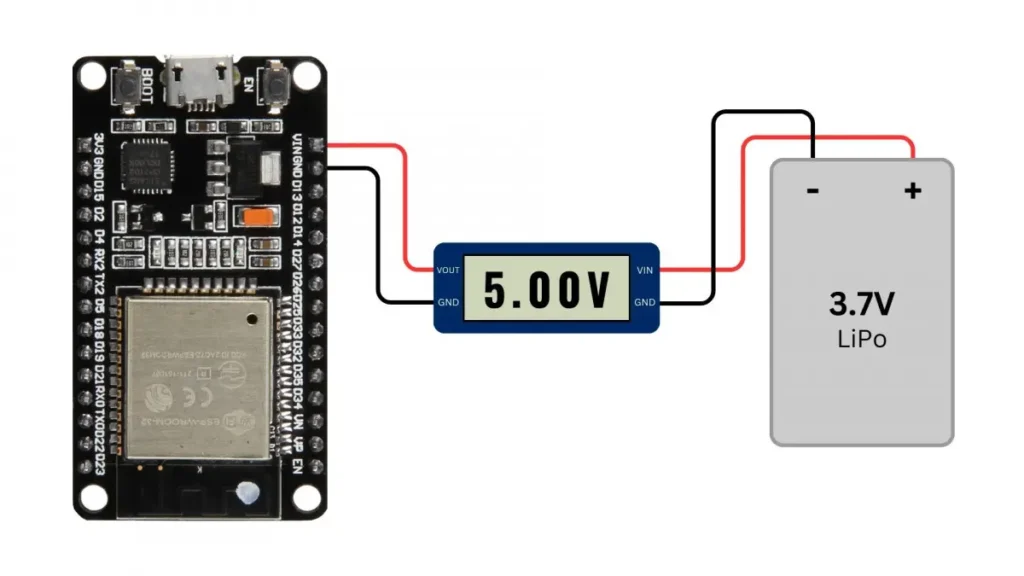
Also, check out the voltage/current requirements and troubleshooting tips from the 3V3 and VIN pins.
Yes, you can power an ESP32 development board with a USB power bank via the micro-USB or USB-C port on your ESP32. However, some power banks automatically shut off if the ESP32 draws very little current (e.g., in deep sleep mode).
To prevent this, use a power bank that supports low-power mode, or add a small dummy load like an LED to keep the power bank active.
You can also use the QC (Quick Charge) port of your power bank; it will only provide the necessary 5V to your ESP32 board.
It depends on the board’s design. Some ESP32 development boards include automatic power switching circuits to safely switch between USB and battery power at the VIN pin. However, if your board lacks this feature, directly connecting both power sources can cause damage.
Also, never connect an external power source to the 3V3 pin while powering the ESP32 board via USB. This will cause damage to many boards!
| Power Source | Pros | Cons |
| USB | ✅Easey to use ✅No extra components required ✅Power while programming | ❌Not ideal for portable, standalone projects |
| VIN/3V3 Pin (Battery) | ✅Ideal for battery-powered projects ✅Great for standalone projects ✅Higher power capacity | ❌May require additional hardware ❌Harder to implement (can cause damage if not done correctly) |
| ✅ Easy to use ✅No extra components required ✅Power while programming | ✅Great for standalone projects ✅Higher power capacity | ❌May require additional hardware ❌Harder to implement (can cause damage if not done correctly) |
Choosing the right power method for your ESP32 projects depends on your power source and use case:
Always ensure you’re using the correct voltage and sufficient current to avoid stability issues and frying your boards.
What’s your preferred way to power the ESP32? Let me know in the comments!
Thanks for reading
Links marked with an asterisk (*) are affiliate links, which means we may receive a commission for purchases made through these links at no extra cost to you. Read more on our Affiliate Disclosure Page.


![ESP32 IR Receiver: How To Detect IR Remote Signals [Arduino IDE]](https://ebokify.com/wp-content/uploads/2026/01/ESP32-IR-Receiver-How-To-Detect-IR-Remote-Signals-Arduino-IDE-1-768x512.webp "ESP32 IR Receiver: How To Detect IR Remote Signals [Arduino IDE] 11")