Book Categories:


Wait, don't go!
Become a Member Today and Unlock Access to All eBooks!
Thousands of eBooks at your fingertips. Read, learn, and grow anytime, anywhere.

AI is all around us in the modern world. You see phrases like “Enhanced by AI” in the advertisements for almost every new product you purchase. However, how can machine learning be implemented natively on small devices, such as microcontrollers, without relying on online APIs? TensorFlow Lite for Microcontrollers is the answer!
From figuring out which microcontrollers support TensorFlow Lite to deploying a trained AI model on Arduino, ESP32, and other platforms, this article will teach you how to use TensorFlow Lite to apply machine learning on microcontrollers.
Continue reading!
Yes, machine learning is not only possible on microcontrollers, but it’s also becoming increasingly practical thanks to advancements in hardware and optimized frameworks like TensorFlow Lite. In the past, machine learning models required powerful CPUs or GPUs to handle demanding computations. However, there has been a move toward directly running AI models on low-power devices, including microcontrollers.
Microcontrollers, like the Arduino and ESP32, are designed for lightweight, real-time applications with limited processing power and memory. While they can’t handle the large, complex models used by cloud-based systems, they can run smaller, optimized models that perform specific tasks, such as voice recognition, gesture detection, or anomaly detection.
TensorFlow Lite (TFLite) is a lightweight version of Google’s TensorFlow framework designed to deploy machine learning models on low-power devices like smartphones, IoT devices, and microcontrollers. This framework is optimized for devices with limited power and memory, making it ideal for real-time inference on the edge.
TensorFlow Lite offers two key components: the TensorFlow Lite interpreter, which efficiently runs the model on-device, and the TensorFlow Converter, which converts full TensorFlow models into the lighter, optimized TensorFlow Lite format.
In addition, the framework offers model optimization techniques, such as quantization, which significantly reduce the model size without sacrificing much accuracy.

Two of the most commonly used microcontrollers for TensorFlow Lite are the Arduino and ESP32. Both are cost-effective, widely available, and well-documented, making them ideal AI and machine learning platforms.
Of course, some other, less well-known options are getting updated over time.
Here’s the official list of supported devices.
Currently, the only Arduino board supported by TensorFlow Lite is the Arduino Nano 33 BLE Sense, which is specifically designed for machine learning applications, as well as IoT and BLE (Bluetooth-Low-Energy) projects.
Probably the most commonly used microcontroller boards for machine learning projects are based on the ESP32.
Its dual-core processor offers more power than most other microcontrollers, making it a perfect choice for TinyML applications, like keyword spotting.
Check out how to install the ESP32 in the Arduino IDE here!
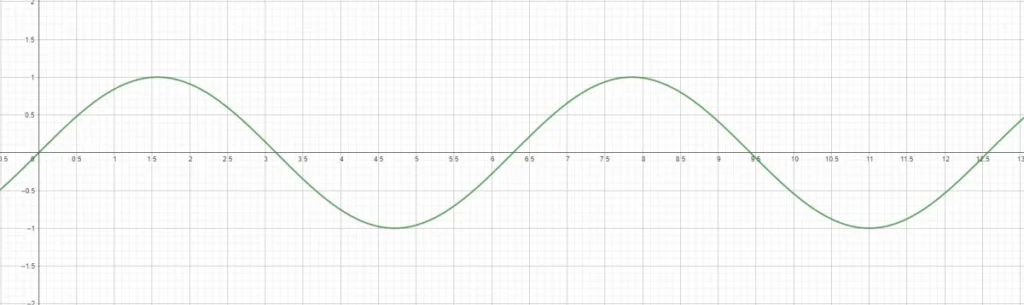
In this TensorFlow Lite for Microcontrollers tutorial, we are going to train a machine-learning model to predict the y value of the sine wave based on the x value we provide it with.
For instance, for the value 3.14, the output we expect is close to 0.
As Microcontrollers don’t offer much processing power, training a machine learning model on one is way too inefficient and would take too much time.
Therefore, we are going to make use of Google Colab.
Colab is a free-to-use online Python notebook that allows you to write code in your browser while being hooked up to powerful cloud computers to run the training for our machine-learning model.

Use this free Colab Notebook to follow along with the tutorial: TensorFlow Lite for Microcontrollers notebook
Before we can train a machine learning model, we need some data to train it on.
Luckily, gathering data for our simple example projects is relatively easy.
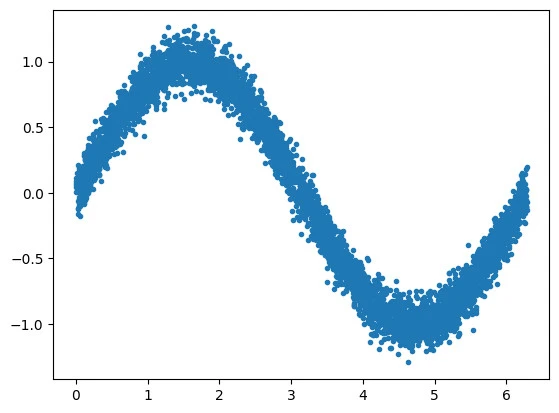
We will generate some random numbers and calculate their sine value.
To prevent the model from just memorizing the exact result for each value instead of making a guess, we will apply some noise:
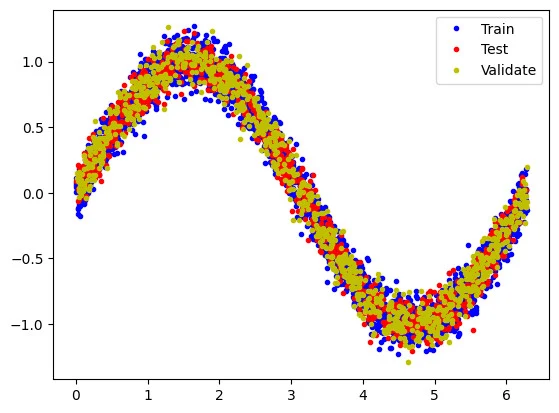
Next, we need to split our data into actual training data, validation data to learn about the model’s performance, and test data to check how accurate our model is in the wild.
Training a machine learning model for microcontrollers follows a similar process to training any standard model. In fact, training the model is done with standard TensorFlow. TensorFlow Lite comes into play later, where we need to optimize the trained model to run on devices with limited computational power.
To begin with the training, we first need to create a machine learning model with Keras that specifies how many hidden and output layers we have. Of course, we want only one output value, which is the predicted value of the sine wave at a given input value.
Next, we apply an optimizer, a loss function, and metrics to the model and compile it.
Now, the training can begin.
Additionally, we display some graphs that showcase how our model performs.
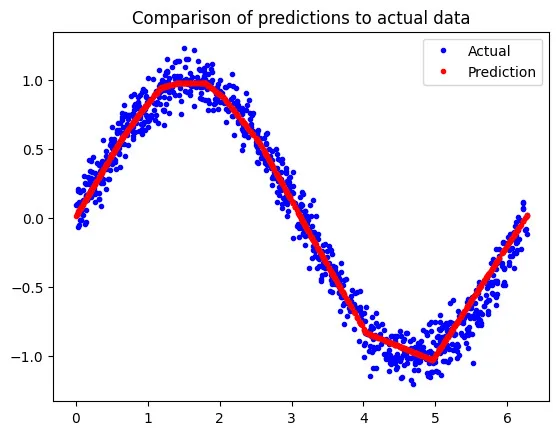
Now that our model is trained and predicts accurate sine values, we must optimize it for running on a microcontroller with limited power.
That’s where we are finally going to make use of TensorFlow Lite.
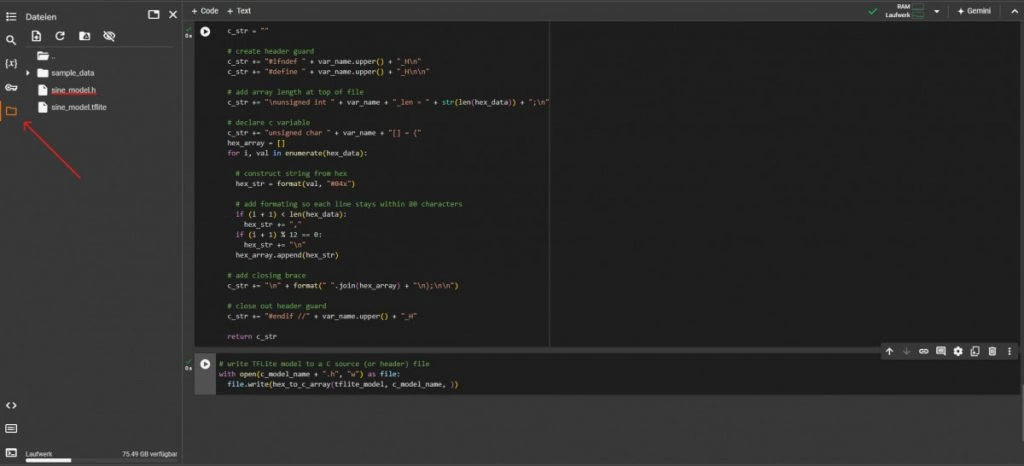
The optimized TFLite model is then saved as a file of hex values. In order to make use of these values on the microcontroller, we convert the hex values into a C array and save it as a C header file.
Download the “sine_model.h” file from the cloud computer via the file explorer on the left.
Example Microcontroller: ESP32
The final step of deploying the machine learning model to a microcontroller is writing the code to run the model on it. For this example, I used the Arduino IDE to program my ESP32 to light up the internal LED based on the predicted sine values. Of course, the code works on the Arduino as well.
Get the official TensorFlow Lite Micro library for the Arduino IDE required to run the code here.
In the Arduino IDE, create a new sketch and copy the sine_model.h file we generated earlier into the sketch folder together with your .ino file.
Use the following code to make your microcontroller print the inferred values of a sine wave to the serial monitor and light up an LED according to those values.
// Import TensorFlow stuff
#include "tensorflow/lite/micro/kernels/micro_ops.h"
#include "tensorflow/lite/micro/micro_interpreter.h"
#include "tensorflow/lite/micro/micro_mutable_op_resolver.h"

// our model
#include "sine_model.h"

// settings
#define LED 2                                        // ESP32 LED
#define PI 3.14159265                                // pi
constexpr float FREQ = 0.5;                          // frequency of the sine wave
constexpr float PERIOD = (1 / FREQ) * (1000000);     // period in microseconds

namespace {
  const tflite::Model *model = nullptr;
  tflite::MicroInterpreter *interpreter = nullptr;
  TfLiteTensor *input = nullptr;
  TfLiteTensor *output = nullptr;
  int inference_count = 0;

  constexpr int kTensorArenaSize = 2 * 1024;
  uint8_t tensor_arena[kTensorArenaSize];
}

void setup() {

  //Serial.begin(9600);
  pinMode(LED, OUTPUT);

  // Map the model into a usable data structure
  model = tflite::GetModel(sine_model);
  if (model->version() != TFLITE_SCHEMA_VERSION) {
    printf("Model version does not match schema!");
    return;
  }

  // Pull in only needed operations (should match NN layers)
  static tflite::MicroMutableOpResolver<1> resolver;
  if (resolver.AddFullyConnected() != kTfLiteOk) {
    return;
  }

  // Build an interpreter to run the model
  static tflite::MicroInterpreter static_interpreter(model, resolver, tensor_arena, kTensorArenaSize);
  interpreter = &static_interpreter;

  // Allocate memory from the tensor_arena for the model's tensors
  TfLiteStatus allocate_status = interpreter->AllocateTensors();
  if (allocate_status != kTfLiteOk) {
    MicroPrintf("AllocateTensors() failed");
    return;
  }

  // Assign model input and output buffers (tensors) to pointers
  input = interpreter->input(0);
  output = interpreter->output(0);
}

void loop() {

  // Get current timestamp and modulo with period
  unsigned long timestamp = micros();
  timestamp = timestamp % (unsigned long)PERIOD;

  // Calculate x value to feed to the model
  float x_val = ((float)timestamp * 2 * PI) / PERIOD;

  // Copy value to input buffer (tensor)
  input->data.f[0] = x_val;

  // Run inference
  TfLiteStatus invoke_status = interpreter->Invoke();
  if (invoke_status != kTfLiteOk) {
    printf("Invoke failed on x: %f\n", static_cast<double>(x_val));
  }

  // Read predicted y value from output buffer (tensor)
  float y_val = output->data.f[0];

  // Translate to a PWM LED brightness
  int brightness = (int)(255 * y_val);
  analogWrite(LED, brightness);

  // Print value
  printf("%f\n", static_cast<float>(y_val));
}
Here’s what it should look like:
In conclusion, machine learning for microcontrollers is totally possible with the TensorFlow Lite framework. It optimizes your models to run on low-power devices like the Arduino or ESP32.
Using Google Colab, training and converting a machine learning model using Tensorflow Lite becomes really easy. Also, libraries like the tflite-micro library for the Arduino IDE make up for a straightforward development process!


![ESP32 IR Receiver: How To Detect IR Remote Signals [Arduino IDE]](https://ebokify.com/wp-content/uploads/2026/01/ESP32-IR-Receiver-How-To-Detect-IR-Remote-Signals-Arduino-IDE-1-768x512.webp "ESP32 IR Receiver: How To Detect IR Remote Signals [Arduino IDE] 13")